Natural Eyes Procreate Palette: Perfecting Realistic Portraits
Capturing the Nuance of the Human Gaze
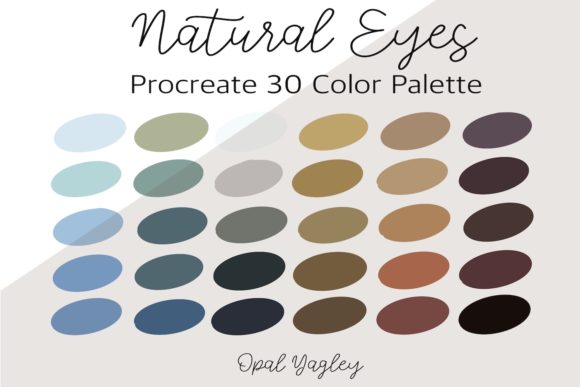
Creating a convincing digital portrait often hinges on the smallest details, particularly the eyes. They are the focal point of human connection, and getting their color right is a challenge many digital artists face. The Natural Eyes Procreate Color Palette is a specialized tool designed to solve this specific problem. This isn't a general-purpose set of swatches; it's a curated collection of 30 colors specifically formulated for rendering realistic, lifelike eye colors. The palette moves beyond simple blues, greens, and browns, offering the subtle undertones, muted accents, and nuanced shades needed to capture the complex beauty of a human iris. Its personality is one of precision and subtlety, aimed at artists who value realism over stylized abstraction.
The visual appeal of this palette lies in its authenticity. Each color feels drawn from nature, avoiding the oversaturated, digital-looking tones that can make a portrait feel flat. You'll find the deep, cool shadows within a brown eye, the flecks of gold in a green iris, and the soft, greyish tones that give a blue eye depth and dimension. This careful selection makes the Natural Eyes Procreate Color Palette an invaluable design asset for anyone working on character design, portraiture, or any project where a human element is central. It provides a foundation for building trust and emotional resonance through a character's gaze.
Where This Palette Transforms Your Creative Projects
The utility of a specialized tool like the Natural Eyes Procreate Color Palette extends across a wide range of creative and commercial applications. Its strength is most apparent in projects where realism and human connection are paramount. For designers and brand strategists, this palette can be a key component in developing a brand identity that feels approachable and genuine. Imagine a health and wellness brand, a financial advisor's website, or a non-profit's annual report. Using portraits with realistically rendered eyes, colored with this palette, can significantly enhance the perception of trust and professionalism. The eyes become a powerful element of visual hierarchy, drawing the viewer in and communicating sincerity without a single word.
Beyond branding, its practical value shines in publishing and editorial design. A book cover featuring a character with compelling, believable eyes can immediately signal genre and tone. Bloggers and content creators can use it to craft unique, high-quality social media graphics that stand out in a crowded feed. For the hobbyist or crafter, it elevates personal projects like family portraits or digital scrapbooking from simple snapshots to cherished pieces of art. The palette is a creative font for the eyes, offering a vocabulary of color that speaks directly to the viewer's subconscious understanding of human expression. It’s a premium font equivalent for portraiture, providing a level of detail that elevates the entire piece.
Practical Guidance for Integrating This Tool into Your Workflow
Getting started with the Natural Eyes Procreate Color Palette is a straightforward process, designed for a seamless iPad workflow. After purchasing, you receive a single zip file. Unzipping this on your iPad reveals a Procreate swatch file containing all 30 colors. The installation is intuitive: download the swatch file using Safari, locate it in your downloads, and select the "Open In Procreate" option. The palette will then automatically appear in your palettes section, ready for use. This simplicity is a significant advantage, allowing you to move from download to creation in minutes without navigating complex folder structures or settings.
When using the palette, think of it as a set of foundational tones for your font pairing of color and light. Start by selecting a base color for the iris—be it for blue eyes, green eyes, brown eyes, hazel eyes, or black eyes. Then, use the other shades in the palette to add depth. Use the darker tones for the pupil and the limbal ring (the dark outer edge of the iris). Introduce the lighter, more muted tones for highlights and subtle variations within the iris structure. A key design observation is to avoid using pure white for highlights; instead, use the softest, lightest shade from the palette that complements the base eye color. This maintains the natural, organic feel. For commercial projects, always review the license to ensure your use case, whether for a client's logo design or packaging design, is covered. This palette is a tool for achieving consistency and professionalism, ensuring the eyes in your portraits always look believable and engaging, no matter the context.